Remember that guy, Michael Winslow, from the Police Academy movies? The one who made all those strange sounds with his mouth? How many of you have a student like that in your class? As you walk across the room, this is that special child that makes squeaking noises for every step you take, putting his classmates in hysterics. Few things amuse this kid more than the variety of different sounds made by gas escaping from the human body - and he can reproduce any one of them at will. Rather than strangle this child, maybe it would be better to let this unique individual express his talents in a constructive way.
Sound effects are a big part of creating a dramatic audio podcast. They can take your story and give it depth, creating a rich sound picture for your listeners. A good sound effect can create a picture in someone’s mind much easier than it would be to produce that same image on film or video. This is why I like the simple elegance of the audio podcast. You can create a multi-layered soundscape with relatively little effort or resources. No need for expensive equipment, dangerous stunts, or elaborate sets.
Creating sound effects can be fun. Did you know you can mimic the sound of a crackling fire by slowly crinkling a bag of potato chips? Sliding the lid off of a toilet tank sounds just like someone opening an ancient sarcophagus. Rapidly opening and closing an umbrella sounds like a bat flying. And of course any self-respecting Monty Python fan knows that two hollowed out coconut shells are a prefect substitute for a galloping horse.
With all the attention given to student created video I think we should not forget about the power of audio. An audio podcast project can be a great choice if you don’t have a lot of time or resources. Using free software like Audacity you can record your story, add music and sound effects, and export your show as a podcast friendly mp3 file in just a fraction of the time and effort it would take to do the same project as a video production.
To encourage students and teachers at my school to learn to use audio podcasts, I created an online elective course that teaches them about podcasting and how to use Audacity to create their own podcasts and post them on our system. I’ve also taken many elements of that course and posted them online on my wiki so you can share them with your students and faculty too.
Make Your Own Podcast Wiki
Feel free to use these resources and share them with your students and teachers. If you or your students create some great podcasts as a result, please reply with a link so we can all hear what you’ve done.
Showing posts with label podcast. Show all posts
Showing posts with label podcast. Show all posts
Monday, January 19, 2009

Tuesday, July 31, 2007
A Digital Story
Digital Storytelling is a powerful way for your students to express their creativity. It's more than just a product, it's also about the process. Let me explain...
My grandfather, Roy Grice (I call him "Grampa"), is 96 years old. Last week I had a unique opportunity to travel with him down to San Diego to see the USS Midway, a retired aircraft carrier, now turned into a floating museum at the Navy Pier in San Diego, CA.
While we explored the ship, it brought back memories of his days in the Navy. Thankfully I was able to record some of his recollections and put them together into the podcast embedded below. While the recording probably has more value to me and my family, it also offers a glimpse into one man's view of history - as he experienced it.
It's important to me, that his stories live on after he is gone. With the digital tools available today, recording and sharing those stories is now easier than ever.
While editing this podcast together I must have listened to it more than a dozen times. By going through this process I know I'll retain much more of what Grampa told me - more than I ever would have just listening to him tell it to me once. Plus, I'll be able to go back to it as often as I want.
What digital stories could your students share?
Listen to Grandpa's Story...

The USS Midway Museum

"Grampa" next to a milling machine in the USS Midway machine shop.
Technical Info:
My grandfather, Roy Grice (I call him "Grampa"), is 96 years old. Last week I had a unique opportunity to travel with him down to San Diego to see the USS Midway, a retired aircraft carrier, now turned into a floating museum at the Navy Pier in San Diego, CA.
While we explored the ship, it brought back memories of his days in the Navy. Thankfully I was able to record some of his recollections and put them together into the podcast embedded below. While the recording probably has more value to me and my family, it also offers a glimpse into one man's view of history - as he experienced it.
It's important to me, that his stories live on after he is gone. With the digital tools available today, recording and sharing those stories is now easier than ever.
While editing this podcast together I must have listened to it more than a dozen times. By going through this process I know I'll retain much more of what Grampa told me - more than I ever would have just listening to him tell it to me once. Plus, I'll be able to go back to it as often as I want.
What digital stories could your students share?
Listen to Grandpa's Story...

The USS Midway Museum

"Grampa" next to a milling machine in the USS Midway machine shop.
Technical Info:
- Audio edited using iMovie and exported as a .aif file. (I didn't have a voice recorder, so I used a camcorder to capture the audio.)
- Converted to .mp3 using Audacity.
- Mp3 file uploaded to GCast.
Thursday, June 14, 2007
Let's Go Back to Kindergarten
There are days when I want to go back to Kindergarten. I want to paint. I want to build things with blocks and Legos. I want to make inventions. I want to learn about about butterflies and then make one out of construction paper and see if I can make it fly just like a real butterfly. I want to use my imagination. I want to learn just because its fun to learn. I miss those days.
If you get a chance to observe a Kindergarten class sometime, it won't take long for you to sense the energy in the air. There's an excitement in the room because learning is not about working to get a good grade, learning is fun. Somewhere between kindergarten and high school our students seem to lose this enthusiasm. The model of learning changes from one of creativity and exploration to one of listen, memorize, and regurgitate.
Dr. Mitchel Resnick, the inventor of Lego Mindstorms, would like to bring back the Kindergarten model of education. He emphasizes the need for creativity in a world where our students seem to lack the skills needed to solve problems. In a society where creative ideas and solutions are sought after and rewarded, our school systems seemed focused on teaching to the test.
Last month, Alan November interviewed Dr. Resnick and posted it on his blog. (Go to Alan November's blog to hear the interview.) Dr. Resnick discussed the work being done with his Lifelong Kindergarten Group at MIT where students learn by being creative. They solve problems by inventing robots using Mindstorms and Crickets. They also create and share their own video games online using an ingenious programming "language" called Scratch.
If you have a little extra time, I strongly encourage you to watch Dr. Resnick's lecture given on May 22, 2006 at the MIT Museum.
"Sowing the Seeds for a More Creative Society"
There are two ways to view the video...
1) Download the lecture from iTunes. (FREE 146MB)
2) Stream it from the MIT Museum site. (Requires Real Player)
The video is a little over one hour. The first half is the lecture, followed by a question and answer session.
If you get a chance to observe a Kindergarten class sometime, it won't take long for you to sense the energy in the air. There's an excitement in the room because learning is not about working to get a good grade, learning is fun. Somewhere between kindergarten and high school our students seem to lose this enthusiasm. The model of learning changes from one of creativity and exploration to one of listen, memorize, and regurgitate.
Dr. Mitchel Resnick, the inventor of Lego Mindstorms, would like to bring back the Kindergarten model of education. He emphasizes the need for creativity in a world where our students seem to lack the skills needed to solve problems. In a society where creative ideas and solutions are sought after and rewarded, our school systems seemed focused on teaching to the test.
Last month, Alan November interviewed Dr. Resnick and posted it on his blog. (Go to Alan November's blog to hear the interview.) Dr. Resnick discussed the work being done with his Lifelong Kindergarten Group at MIT where students learn by being creative. They solve problems by inventing robots using Mindstorms and Crickets. They also create and share their own video games online using an ingenious programming "language" called Scratch.
If you have a little extra time, I strongly encourage you to watch Dr. Resnick's lecture given on May 22, 2006 at the MIT Museum.
"Sowing the Seeds for a More Creative Society"
There are two ways to view the video...
1) Download the lecture from iTunes. (FREE 146MB)
2) Stream it from the MIT Museum site. (Requires Real Player)
The video is a little over one hour. The first half is the lecture, followed by a question and answer session.
Thursday, May 03, 2007
Let Them Be Heard - ONLINE!
Any primary teacher can tell you that students' reading improves if they can hear themselves read. Remember using that old Califone cassette recorder in the back of your classroom? Here's a new twist to that activity - Student Audiobooks.
Many of you have students write their own stories. First Grade teachers at Grandview Elementary School have taken things a step further. Their first grade student write stories. Then they read those stories into a digital recorder. Their teacher then adds a little music to the beginning and posts them on their class blog.
Even if you don't have a fancy digital voice recorder, you can still hook up a microphone to your classroom computer and record with Audacity or Garageband.
NOTE FOR GARAGEBAND USERS: If students illustrated their own stories, you can scan or take digital pictures of their pages. Then using Garageband, you can insert those pictures above the audio track to create an "enhanced" podcast. Listeners would not only hear the students read, they could also see their artwork.
Now students can go online and listen to their stories and those from other kids in their class. Parents can go online and listen to their children read, or download it to their iPods to share with family and friends.
Many of you have students write their own stories. First Grade teachers at Grandview Elementary School have taken things a step further. Their first grade student write stories. Then they read those stories into a digital recorder. Their teacher then adds a little music to the beginning and posts them on their class blog.
"The stories were recorded using an iRiver mp3 recorder, the music was added and the stories were edited using Audacity, the music clips come from FreePlay Music, the stories are being stored at the archive.org website and this blog is hosted by Edublogs in Australia."Visitors to their class blog can click on the links to hear the students' "Audiobooks". What's pretty cool is the audio files are in MP3 format so they can be imported to iTunes and copied on to an iPod.
Even if you don't have a fancy digital voice recorder, you can still hook up a microphone to your classroom computer and record with Audacity or Garageband.
NOTE FOR GARAGEBAND USERS: If students illustrated their own stories, you can scan or take digital pictures of their pages. Then using Garageband, you can insert those pictures above the audio track to create an "enhanced" podcast. Listeners would not only hear the students read, they could also see their artwork.
Now students can go online and listen to their stories and those from other kids in their class. Parents can go online and listen to their children read, or download it to their iPods to share with family and friends.
Wednesday, April 11, 2007
Potpourri
For those of you looking for a coherent, single topic, instructional blog entry you might as well click the little red “x” and close this window right now. What you’ll be getting today is a hodgepodge of random thoughts and ideas. A Web 2.0 stream of consciousness as it were…
Sounds Good to Me
I’ve devoted several posts to some great video podcasts for use in the classroom, but let’s not forget that there are some pretty good audio podcasts out there too. Getting kids (and teachers) familiar with downloading and subscribing to audio podcasts helps them get an idea of what a podcast is. It also gets them one step closer to producing their own podcasts. Here are a few “baby steps” to get you started:
Grammar Girl’s Quick and Dirty Tips for Better Writing – a weekly program that focuses on writing and good grammar. These 3 – 6 minute podcasts would be good for grades 5 on up. NOTE: You might have to listen to a little ad from their sponsor before they get to the topic.
Radio WillowWeb – Wow! These kids have really taken student made podcasts to the next level. Great educational content from multiple subject areas, written and presented by elementary students. This would be a great model to follow when introducing your kids to making their own podcasts.
Reading Rockets Presents: Meet the Author – Okay all you librarians, pay attention. This has interviews with various authors including Jack Preletusky, Avi, Marc Brown, Patricia Polacco, Katherine Paterson and many others. A great resource!
Wondering if your kids will be able to listen to these? Try this. Ask how many of your students have iPods. I'm guessing the number will be between 90-100%. Even if they don't have iPods they can still listen to podcasts on their computer. Then imagine giving your kids this assignment, "I want you all to go home and listen to your iPod..." You could be the coolest teacher at your school!
Google Earth Tours
Recently a friend and fellow teacher, Janet English*, had a chance to visit South Africa. One of the many things she did there is visit and take a mini safari in Pilanesburg National Park. What’s cool is she created a virtual tour of the park using Google Earth. The tour lets you follow along on her adventure with written descriptions and pictures. I clicked through this tour with my 5 year old niece over Easter Break and had her try to see how many animals she could name. She got almost all of them.
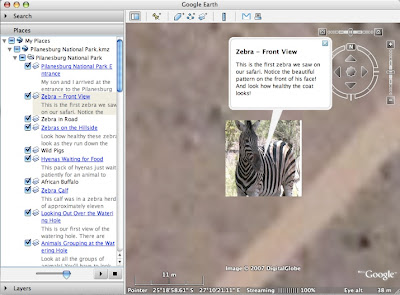
Wouldn’t something like this be a great way to create digital stories of some of the interesting places you've visited and share them with your class? I’ve definitely got to learn how to do this! When I do, I’ll be sure to post directions for you. I’ll also see if I can get permission to post Janet's virtual tour file in a future blog.
*Janet is currently Senior Director of Education and New Media at KOCE-TV (Orange County's PBS Station)
Speaking of Blogs
As long as I’m talking about South Africa, I encourage everyone to check out Janet’s South African World Summit Blog. It contains some great photos, podcasts, and interviews with children from South Africa and around the world. This is a great way to let your students hear voices and thoughts from kids their own age and see how they are alike and different.
For students studying the American Civil Rights movement, this blog also provides some insight into the current struggle for equality in South Africa. Read and listen to what is going on right now and compare it to our own history. Ask your students if they see any similarities or differences. What have we learned from our experience here in the US that might help them deal with their present situation? (What do you think? An interesting class project?)
Planet Earth
Have you been watching Planet Earth on the Discovery Channel? Not only does this amazing program make me want to spend $2000 for a High Definition TV, it's also got some great educational resources as well. Check out the Discovery Channel Planet Earth site for
Sounds Good to Me
I’ve devoted several posts to some great video podcasts for use in the classroom, but let’s not forget that there are some pretty good audio podcasts out there too. Getting kids (and teachers) familiar with downloading and subscribing to audio podcasts helps them get an idea of what a podcast is. It also gets them one step closer to producing their own podcasts. Here are a few “baby steps” to get you started:
Grammar Girl’s Quick and Dirty Tips for Better Writing – a weekly program that focuses on writing and good grammar. These 3 – 6 minute podcasts would be good for grades 5 on up. NOTE: You might have to listen to a little ad from their sponsor before they get to the topic.
Radio WillowWeb – Wow! These kids have really taken student made podcasts to the next level. Great educational content from multiple subject areas, written and presented by elementary students. This would be a great model to follow when introducing your kids to making their own podcasts.
Reading Rockets Presents: Meet the Author – Okay all you librarians, pay attention. This has interviews with various authors including Jack Preletusky, Avi, Marc Brown, Patricia Polacco, Katherine Paterson and many others. A great resource!
Wondering if your kids will be able to listen to these? Try this. Ask how many of your students have iPods. I'm guessing the number will be between 90-100%. Even if they don't have iPods they can still listen to podcasts on their computer. Then imagine giving your kids this assignment, "I want you all to go home and listen to your iPod..." You could be the coolest teacher at your school!
Google Earth Tours
Recently a friend and fellow teacher, Janet English*, had a chance to visit South Africa. One of the many things she did there is visit and take a mini safari in Pilanesburg National Park. What’s cool is she created a virtual tour of the park using Google Earth. The tour lets you follow along on her adventure with written descriptions and pictures. I clicked through this tour with my 5 year old niece over Easter Break and had her try to see how many animals she could name. She got almost all of them.

Wouldn’t something like this be a great way to create digital stories of some of the interesting places you've visited and share them with your class? I’ve definitely got to learn how to do this! When I do, I’ll be sure to post directions for you. I’ll also see if I can get permission to post Janet's virtual tour file in a future blog.
*Janet is currently Senior Director of Education and New Media at KOCE-TV (Orange County's PBS Station)
Speaking of Blogs
As long as I’m talking about South Africa, I encourage everyone to check out Janet’s South African World Summit Blog. It contains some great photos, podcasts, and interviews with children from South Africa and around the world. This is a great way to let your students hear voices and thoughts from kids their own age and see how they are alike and different.
For students studying the American Civil Rights movement, this blog also provides some insight into the current struggle for equality in South Africa. Read and listen to what is going on right now and compare it to our own history. Ask your students if they see any similarities or differences. What have we learned from our experience here in the US that might help them deal with their present situation? (What do you think? An interesting class project?)
Planet Earth
Have you been watching Planet Earth on the Discovery Channel? Not only does this amazing program make me want to spend $2000 for a High Definition TV, it's also got some great educational resources as well. Check out the Discovery Channel Planet Earth site for
- The Planet Earth Animal Guide
- Animal Matching Game
- Planet Earth Game - You're the producer
- Google Earth Tour- Download and open this in Google Earth and see where different segments were filmed and link to streaming video clips.
Monday, February 05, 2007
Even More Podcasts
At our district technology meeting today, Rene Drevlow from Zion Lutheran School in Anaheim shared these FREE video podcasts she discovered on iTunes. If you have iTunes installed on your computer, clicking on the link will open iTunes and take you directly to that podcast.
Titles for Primary Grades:
Nickjr: Blue's Clues - 3 minute segments from the Nick Jr. kids show.
DragonflyTV Podcast - Ordinary kids doing extraordinary science investigations. (from PBS Kids)
Share the Earth...This is Our Earth - Songs about the Earth (from PBS Kids)
Miss Lori and Hooper - Themed activities, music, and movement. (from PBS Kids)
Want to Learn about Mac OSX?
Mac OS X for Your Classroom - Created by a school district in DesPlains, Ill.
Learn Mac OS X Tiger - a 16-minute video explaining how to set your personal preferences.
Learn Mac OS X - An Apple a Day Keeps the Viruses Away - More system preferences, using AIM with iChat, and more OS X help
If you find any other great iTunes video podcasts for education, please comment and let me know.
Thanks for your contribution Rene.
For more info on how to use Video Podcasts and iTunes, see my previous post (Dec. 6, 2006)
Titles for Primary Grades:
Nickjr: Blue's Clues - 3 minute segments from the Nick Jr. kids show.
DragonflyTV Podcast - Ordinary kids doing extraordinary science investigations. (from PBS Kids)
Share the Earth...This is Our Earth - Songs about the Earth (from PBS Kids)
Miss Lori and Hooper - Themed activities, music, and movement. (from PBS Kids)
Want to Learn about Mac OSX?
Mac OS X for Your Classroom - Created by a school district in DesPlains, Ill.
Learn Mac OS X Tiger - a 16-minute video explaining how to set your personal preferences.
Learn Mac OS X - An Apple a Day Keeps the Viruses Away - More system preferences, using AIM with iChat, and more OS X help
If you find any other great iTunes video podcasts for education, please comment and let me know.
Thanks for your contribution Rene.
For more info on how to use Video Podcasts and iTunes, see my previous post (Dec. 6, 2006)
Saturday, January 06, 2007
Video Podcast Update
Here's an update to my earlier list of video podcasts. Remember you don't need an iPod to view a podcast. All you need iTunes software (available FREE at www.apple.com/itunes/download). To find these podcasts go to the iTunes Store and search for the following...
(If you have iTunes already installed, clicking on the links below will start iTunes and take you directly to that podcast.)
NOVA Vodcast - Short video stories from the PBS series
Ask an Astronomer - Real NASA astronomers answer questions like: "Can you feel solar wind?", "What is redshift?", and "How can we see a black hole?"
NASAcast Video - an RSS newsfeed with the latest NASA videos
NASA's Jet Propulsion Laboratory Podcast - Contains both video and audio clips
Sun-Earth Education - NASA - the sun and its effect on the Earth
Nature PBS - collection of 2-5 minute clips from various episodes from the PBS series.
CNN Student News - The same program that's broadcast for teachers to record in the wee hours of the morning. Don't forget to go to www.cnn.com/EDUCATION to download the daily transcripts and news quiz.
To learn more about using iTunes and video podcasts click here to go to my earlier post: FREE Video Podcasts for Teachers
(If you have iTunes already installed, clicking on the links below will start iTunes and take you directly to that podcast.)
NOVA Vodcast - Short video stories from the PBS series
Ask an Astronomer - Real NASA astronomers answer questions like: "Can you feel solar wind?", "What is redshift?", and "How can we see a black hole?"
NASAcast Video - an RSS newsfeed with the latest NASA videos
NASA's Jet Propulsion Laboratory Podcast - Contains both video and audio clips
Sun-Earth Education - NASA - the sun and its effect on the Earth
Nature PBS - collection of 2-5 minute clips from various episodes from the PBS series.
CNN Student News - The same program that's broadcast for teachers to record in the wee hours of the morning. Don't forget to go to www.cnn.com/EDUCATION to download the daily transcripts and news quiz.
To learn more about using iTunes and video podcasts click here to go to my earlier post: FREE Video Podcasts for Teachers
Wednesday, December 06, 2006
FREE Video Podcasts for Classrooms
You know how much I love the word "FREE". Now you can get free videos to share with your students by subscribing to video podcasts on iTunes.
WHAT DO I NEED?
an iPod - Believe it or not, you don't need an iPod to watch a podcast. You can watch it on your computer. Or you can connect your computer to a data projector.
Okay, so what do I have to do?
Launch iTunes and go to the Music Store. I found some great video podcasts by searching for the following...
To subscribe to these podcasts you'll need to go the "Advanced" menu in iTunes. Select "Subscribe to Podcast". Type the following URL in the box and click "Add": http://feeds.feedburner.com/brainbites/nasa
These are just 4 video podcasts I was able to find last weekend. If you find any other good ones, please let me know.
Thanks.
[Click here to download this post in a printable handout.]
WHAT DO I NEED?
- a computer
- Internet access (cable, DSL or something fast is definately a plus!)
- iTunes Software (version 7 is available free at www.apple.com/itunes/download)
an iPod - Believe it or not, you don't need an iPod to watch a podcast. You can watch it on your computer. Or you can connect your computer to a data projector.
Okay, so what do I have to do?
Launch iTunes and go to the Music Store. I found some great video podcasts by searching for the following...
- "Ecogeeks" - Science video podcasts that explain science topics in a fun and exciting way. Hosts and filmmakers are trained biologists. For more info about the episodes visit their site: www.thewildclassroom.com/home/nav/podastingscience.html
- "Electronic Field Trips" - A series of 4 – 8 minute Webisodes from the Ball State University Electronic Field Trip Program. The current list includes videos from Field Trips to
- "isallaboutmath" - (no spaces) Covers various topics in mathematics. Good for upper elementary & middle school. Topics include: triangular numbers, summations, mathematical induction.
To subscribe to these podcasts you'll need to go the "Advanced" menu in iTunes. Select "Subscribe to Podcast". Type the following URL in the box and click "Add": http://feeds.feedburner.com/brainbites/nasa
These are just 4 video podcasts I was able to find last weekend. If you find any other good ones, please let me know.
Thanks.
[Click here to download this post in a printable handout.]
Subscribe to:
Posts (Atom)


